UPDATE: 2 March 2009 – Visto Acquires Good
Message to Visto folks – I know your product set well but the Good mobile messaging product is sensational. Please promise to keep innovating the Good suite – it is the closest thing to mobile mail nirvana I have ever seen. When I could not get Good for my E71, I had to turn to Visto – there is no comparison so please keep investing in the Good product and team.
UPDATE: 10 December 2008
Good Mobile Messaging has announced that the Nokia E71 is now compatible with Good Mobile messaging. I now have Good working on my E71 in London via Fasthosts hosted exchange.
Some quick tips for you to get the best experience and ensure a smooth ride.
- Make sure your IT Manager/Admin or hosted exchange provider has upgraded their Good server to the latest version. Your GMM server needs to be running Good 5.0 SR1 (Exchange Server 5.0.3.19 Domino Server 5.0.3.18) or Good 5.0 SR2 (Exchange Server 5.0.4.28 Domino Server 5.0.4.27)
- Ask your IT Manager/Admin or hosted exchange provider to make available GMM 5.1.0.37 (the latest version) for your handset to download via the OTA site at http://get.good.com (access this from your handset)
- One trap for users – once installed and running for a while, the new version may ask for a lock code – the default is 12345. See the release notes on this. There seems to be a small issue here and hopefully the GMM product team can remove the issue where GMM automatically locks the phone after just 20 minutes and the user cannot increase this phone lock timeout
Once downloaded and installed, GMM magically starts to work on the E71!
I will post a longer review of the experience of GMM on the E71 after a few more days of use, but I still maintain that Good Mobile Messaging on an E71 is the ultimate mobile email experience – full stop. Forget Blackberry – Good rocks!
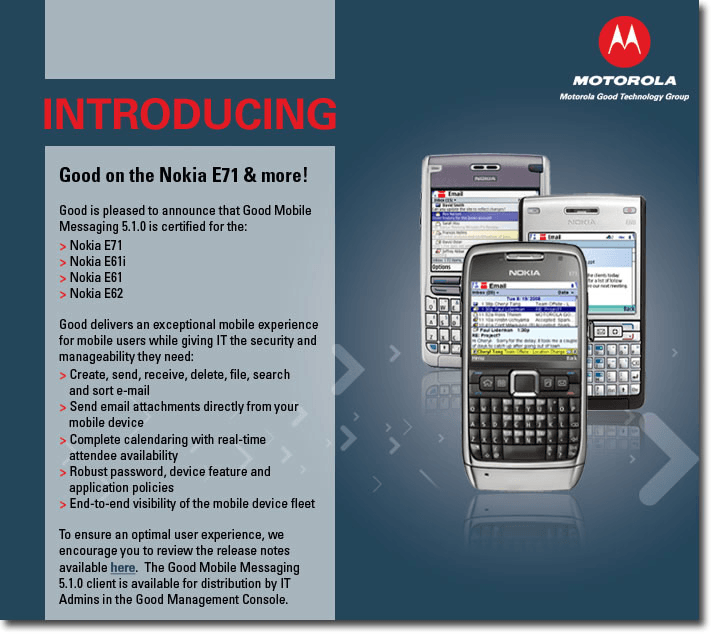
See the official announcement about Good on the E71 at the Be Good portal.
Blogging works! Thanks to the 7000+ readers of this post we convinced Motorola Good to ensure the E71 is supported, and thanks to the team at Good – especially Rona Orenstein and Kitt Gilbert Scott who also took up the case with Fasthosts here in the UK to get them to upgrade their server to support this new release.

UPDATE: November 29 2008
I thought it would be worth an update on this post, as it receives a fair number of hits every day so many others must also be hanging out for the E71 + Goodlink fix.
I’ve been testing version 5.1.0.24 on my E71 and E61i. The good news is that it works on both devices! The keyboard issue with the E71 and version 4.9.3.34 has been fixed, and with version 5 there are some nice new features.
The bad news is that it’s not quite there yet (5.1 is still in Beta). I managed to get GMM 5.1.0.24 downloaded OTA when I went to get.good.com and entered my Fasthosts email credentials, and everything was going fine but I noticed that not all of my 7,200 outlook contacts had been downloaded.
According to the super support team at Motorola Good, I have the “power-user performance issue” – lucky me, but this will be fixed in the final release.
When I ran the new 5.1 client on the E71 on a Goodlink test account (with only 1 contact), it worked perfectly.
I can’t wait for the final release, and to have my E71 humming along with GMM 5 – it is worth the wait.
October update: Blogging works! After reading the post below about how Fasthosts were the ones in the slow lane, I hear that after Fasthosts read my post below, they decided to act – fantastic.
Let’s hope it doesn’t take too long to upgrade their Good server in the UK so I can trial the new GMM symbian version 5.1 beta that is currently being tested by a group of GMM users.
As per the many comments below, Jerry Tian has developed a workaround for the E71 (basically he has modified Antony Paranata’s excellent screenshot program to provide the keyboard mapping that the E71 is lacking when used with Goodlink) which is described in more detail on the Good forum.
Thanks to Jerry signing his version with my IMEI, I have now started using Goodlink with the E71. The fix gives you about 80% of the functionality I had with GMM for the E61i, but this is enough to keep me mobile – thanks Jerry! Let’s hope that the GMM 5.0 beta to be released soon brings full goodlink functionality back to the E71.
LATEST UPDATE FROM GOOD: Beta fix due September, official release of Good 5 for Symbian in December. Info direct from the Be Good portal.
All,
There have been several questions on the possibility of GMM support on Nokia E71 recently.
I wanted to send out a quick update to let you know that Good Mobile Messaging will be supported on the Nokia E71 as part of the next Good Symbian release.
There are several engineering challenges with this device because some critical integration modules we need for our application to function are not available on the E71. We now have a plan to work around those.
The official release date is December 2008. We will have a limited Beta program starting in the last week of September.
If you are a customer interested in joining the Beta program please contact your sales engineer or technical support person.
Regards,
Reena Nadkarni | Group Product Manager | Motorola Good Technology Group
So…it is not long now. Thanks to all the London Calling readers for contributing here and also on the good portal – it seems to have had the desired effect.
From what I know of Good version 5, it has some great new features – so when available on Symbian, the Nokia Good experience will be exceptional.
I’ve been invited to join the beta program for Good Symbian so if I am able, I will report my experiences shortly. Thanks again to the London Calling readers for raising this as an important issue, and proving there are thousands of Good users out there who want to deploy the solution on the new Nokia E71.
UPDATE 1: Since the original post on July 4th, I have had almost 1000 2200 views and multiple emails on the subject. It looks like the new Nokia E71 users craving for their Goodlink mobile email fix are being held back by a bug where Goodlink does not recognise the Nokia E71 keyboard properly – which makes it a bit hard to send email! Good claim a fix is on the way – but let’s hope for all the Nokia E71 Goodlink users that this fix is accelerated and released ASAP.
UPDATE 2: I posted an entry on the Good forum, and received a response from Dan Rudolph, Director of Marketing for Motorola Good Technology Group – his response from the forum is quoted verbatim below:
“Hi Andrew – Good supports the Nokia E61/62 series, but we have never supported the E71. We are looking at adding the E71 and will let you know if we are able to support it. BTW, for everyone out there, you can lookup the devices Good supports in the “supported devices” area after you log into the Good Online Portal at www.good.com/gmp. Or, you can look up basic device support info on the Good web site at http://www.good.com/corp/int_supported_dvcs.php“
Related posts
shortURL for this post: http://ldn.im/151

24 Comments
See also a post on the All About Symbian Blog – let’s prove to Good that the E71 + Goodlink is a must for business users.
http://www.allaboutsymbian.com/forum/showthread.php?p=383096&posted=1#post383096
Well some GOOD news – pun intended. Not confirmed by Good Technologies/Moto (its pretty much the same technology that RIM uses on the BES) but two ppl on the HowardForums.com site have struggled and successfully got it working with their companies admin’s … something to do with changing the PIN on the server.
1> Good Messaging App working:
http://howardforums.com/showpost.php?p=11283279&postcount=2803
(PS yes he does mean the E71 not the N71).
1b> Good App Resolution:
http://howardforums.com/showpost.php?p=11284482&postcount=2820
(PS he previously used BJII device).
2> App working issues typing other than numerals:
http://howardforums.com/showpost.php?p=11291079&postcount=2932
Hope that this helps, and can you confirm with your contacts at Good pls & thanks !
I think the other issue is that because Good have not “officially” marked the E71 as supported, these devices are barred from registering, so the admin has to turn off the security policies to get it working.
We will need Good to fix the E71 issues, and release this news to all the hosted Good providers (like Fasthosts) so when we try our E71′s they will work.
Good are also aware that the E71 keyboad is not properly recognised by the Good application.
They claim they will “have a fix in the next release of the Nokia client”.
As Good is owned my Motorola, we may need to keep the pressure up to fast-track this fix!
Keep the comments coming in – let’s keep up the pressure to get the E71 approved and running normally for all Good users.
Indeed! The security is VERY important! This device just has SO MANY features we’ll see MANY if not ALL E61/i users upgrade before end of summer – especially because of the various HSDPA bands, built-in tethering app for XP/Vista (set in USB options I think), along for the spell check as well – unsure if this’ll play havoc with Good’s standard app.
Good has a STRONG and Good run at supporting various popular devices on varying platforms. This E61 will outsell previous E61 devices so its only logical they’ll get a working app. Hosting services thrive in the USA due to economies of scale; buts its a growing trend for us Canadians to be interested as well. More users on Hosting services (means more awareness for Good), means more license upgrades for Good Technologies.
I just got my E71 and, Golly! What a cool device. Same issue as you do with Good. Every thing went fine from the install process to registration etc…. only pain is this Keyboard issue with the num. keys taking over to the letters !!! I hope this will get resolved soon. Gerald.
Yeah definitely need Goodlink for the E71! Looks amazing apart from the current lack of Goodlink.
I’ve heard of people getting goodlink on other non-supported devices but really this needs to be on Good’s fully supported devices list.
I just got mine today and I have to say that my whole excitement was killed by the Goodlink issues:
1) num key lock
2) Caller ID does not pick up contacts from Good.
Keyboard issue is killing me. Using the stadard editor for replying email and pasting onto good is a constant pain. I might go back to E90 until goodlink folks fix this issue on E71.
Couple ways to get around the lack of Contacts integration that work on the E61i
- Uninstall GoodLink
- Synch contacts using Nokia PC Suite or
- Set up Mail for Exchange and have it synch contacts
- Reinstall Goodlink
You’ll have one set of contacts accessilbe from the Contacts application, the other through Goodlink. Of course, the first won’t sync automatically.
The E71 Goodlink keyboard issue has made it to the Nokia discussions page as other users (like the 900+ who have read this post) are facing the same issue.
See http://is.gd/XR7
There is also a Good Forum – I suggest all those who want Goodlink on their E71 also post an entry.
I have started a thread on this – will be interesting to see the Good response
https://www.good.com/begood/thread/2531
More and more people continue to email me about this problem – one more today from Ramzi.
Hi Andrew, was reading your article about the Goodlink issue with Nokia E71, I bought one and fell in the same trap that the fn key doesnt work using Good. Do you know if they released any fix for this issue?
Let’s hope Motorola/Good are listening to the nearly 1000 people who have viewed this post and need their Good fix on an E71.
Hi Andrew,
I read your post on Good and E71 – interesting. There has been a lot of interest in the E71 and getting Good on it from other customers/partners as well. As you know, devices have become available just a couple of weeks ago. Engineering evaluation is underway and an ETA will come out of those findings.
Initial assessment is that it will require more than a keyboard fix. We hope to find a solution that will ensure that the optimal Good user experience is maintained as much as possible on the E71 as well. I will post an update on the ETA as soon as I have it.
Regards,
-Reena
Reena Nadkarni, Group Product Manager, Motorola Good Technology Group
Keep up the lobbying..im very close to acquiring a e71 and dumping my aweful treo..
through your efforts, atleast we know the situation with the update.!
cheers
I found that if you are in the Launcher or Email, the short cut keys would not work also. but if you go to e-mail, select Menu click M (to move a message) then cancel before selecting the move to folder, the shortcut keys would work in the mail list as well as the laucher untill an email is opened. This would lead me to beleive the fix for the bigger issue is not as complicated.
Originally posted at https://www.good.com/begood/message/1866
I too am a loyal Nokia user and quickly jumped on the E71 bandwagon after using an E61, upgrading to E61i and still currently using an E51 as a more “weekend” phone. The whole reason I started with the Nokia E-series is because I hated the BlackBerry interface and didn’t like the Treo. I had no issues installing GoodLink or getting it to sync emails, etc. but I do have the key lock up issue when trying to compose emails. I know that they keep saying that the fix is coming but do we have an ETA and does anyone have anything to say about Mail for Exchange while we wait?
Another Good Evangelist, Gerald Lampaert joins the growing chorus of E71 users who want their Good fix!
See https://www.good.com/begood/message/1866 and also reposted below.
Hi Andrew, Hello Good Support,
I have to admit that I was also a little disapointed when trying to use GMM on my new Nokia E71.
I think that the E71 is an extremely “Good” device and a great successor to the E61i that I have been using in the past.
Obviously I am not the only one to experience problems with the Keyboard being locked in numeric mode when it comes to write/reply to emails, calendars etc… …and I would have expected differently on a device using the same OS as the previous one.
As the VP of Global Technology for a 3000+ employee company world wide I was looking forward to enjoy GMM on the E 71, and especially since our executives are anxious for me to migrate our 1000+ Blackberry Account to the new E71 with GOOD as the MS Exchange Middle piece (very successful in the past).
So I am joining this community to express my wish to see a “Good” patch to the current issue in a very short term as I am sure it will be of a great benefit for both Nokia and Good (and all of us of course). So far I am using the “ActiveSync” feature to connect to exchange, but I am still not convinced nor satisfied with the environment and the features.
Feel free to contact me by email or by phone should you require any further information.
Best regard and “Good” luck for the patch !
Gerald Lampaert
VP, Global Information Technology, HFTP
Dolce International Hotels, Resorts and Conference Centers
Montvale, NJ USA
It is very frustrating with the keyboard issue. I understand that E71 is not “officially” supported. But it is not a complicated issue to fix. You can issue a simple fix to the keyboard issue right away & worry about other shortcut issues etc., later. I am back to E90 as with keyboard issue E71 is almost useless. If good don’t fix the issue, they will end up losing many customers.
I work for a company that uses all three platforms (Exchange, Good, and BB). I have the ability to use either Good or Exchange. I truly love the E71 but must say that Nokia dropped the ball on exchange support features. I can’t believe they did this as this phone definitely appeals to the business user. I downloaded Good and having the same issues as the others. But if Good can’t get this fixed soon, I’ll be forced to switch back to WM and sell my E71 with no looking back. A loss for Good as my next option will be to buy and unlocked Diamond or Diamond Pro (the Treo Pro is also looking rather nice). 10 days left on my return policy so I hope it can happen fast or it is “Good” bye for “Good” (pun intended).
Folks,
Jerry over Good link forums found a fix for this issue & I have been using it for the past 2 days and it is working like a charm!!
Check the solution at ..
https://www.good.com/begood/message/2303#2303
I can confirm that Jerry’s fix mentioned above does actually work!
Thnaks for your comments on Good Mobile and getting Fasthosts to upgrade their server to GMM 5 – it’s been a year since this upgrade release and it would be great to have the full functionality of the service from this hosted provider as we are paying a premium for the service. I understand the upgrade to their server wouldbe free of charge…so why the delay!
Looking forward to editing and forwarding an attachment and all the other features of GMM5!
Ps Good will soon be releasing GMM6 – wonder how long we will wait for this version from Fasthosts.
Good news! I downloaded a new OTA packaged this weekend and received v5.1.0.24_EN. Works like a charm on my E71. I figured you wanted to know this ;)
Hi
I have been on the Good website but can’t find the fix for the E71 keyboard not working, can someone point me in the right direction?
Thanks
Michelle
What you need to do is to download the GMM 5.1.1.31 version from the SD card here http://l0n.eu/aRgKIr and then sideload to the E71 – this will fix the keyboard problem.
3 Trackbacks
[...] the recent news that the Nokia E71 is not entirely compatible with Good Mobile Messaging, the official Be Good portal was alive with E71 users wanting a quick [...]
[...] E71 will be truly complete when the Goodlink keyboard issue is solved by Motorola Good Technology – hopefully this will be soon. Read this official Good forum [...]
[...] With that in mind, where does the E71 stand? Well, calls seemed to exhibit the same voice quality known to Nokia's Symbian handsets, but the fact that I was …London Calling » Goodlink now works with Nokia E71 [...]